


I approached Veo - Shared Electric Vehicles as a practical travel tool rather than just another mobility app. Its purpose is straightforward: help people find and use shared or personal electric vehicles for shorter journeys. That makes it most interesting when a bus route is inconvenient, a walk feels too long, or a car would be excessive. In my experience, the real question is not whether the idea is appealing, but whether the service fits the way you move through your own area.
VeoRide, the developer behind the app, has built it for the Travel & Local category, and the app is free to install. It carries an Everyone age rating, so the presentation is intended for a broad audience. The current version is 4.68.0, while compatibility begins with Android 7.0. Those details matter because this is an app you may want to open quickly outdoors, possibly on an older phone, when you are already trying to get somewhere.
The app has reached over a million installs and holds a 4.7 average from around seventeen thousand ratings, with roughly four thousand four hundred written reviews. Those figures suggest that it has found a substantial audience, but they do not remove the need to judge it against your own neighborhood, mobility needs, and tolerance for app-based transport. A shared vehicle is only useful when one is available, reachable, and suitable for the trip in front of you.
How clearly the app supports different users
Readability and navigation in everyday use
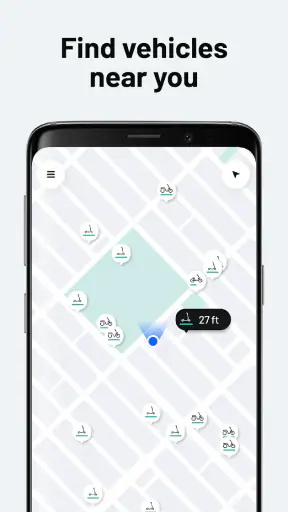
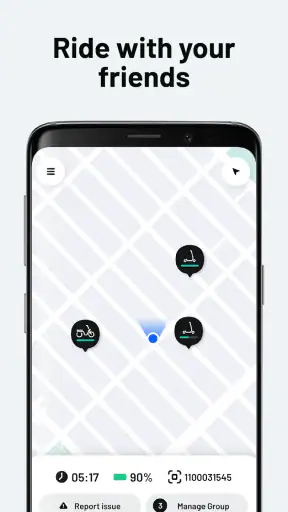
The most important part of a vehicle-sharing app is the map experience. I want to know where vehicles are, how far away they are, and what I need to do next without studying a crowded screen. Veo is at its best when used with a simple plan: open the map, identify a nearby option, walk toward it, and check the ride details before setting off. That sequence is easier to manage than trying to improvise a route after leaving home.
For people who rely on clear visual organization, the app’s usefulness depends heavily on how well the map separates vehicles, streets, and other information. Outdoor glare, a small phone screen, and movement can make any map harder to read. I would check the vehicle location before walking, rather than repeatedly looking down while crossing a busy area. That small habit improves safety and reduces the pressure to interpret the interface while in motion.
I also found that a shared-vehicle app rewards preparation more than spontaneity. Before leaving, it is worth confirming that the vehicle shown on the map is close enough for you to reach comfortably and that your destination is realistic for this type of trip. If you have difficulty reading small labels, use your phone’s built-in display enlargement or text-size settings where available, and pause in a safe place before making selections. These are phone-level adjustments rather than special Veo functions, but they can make the experience less tiring.
Compared with a traditional public-transit app, Veo presents a more immediate decision. A bus app usually asks you to choose a stop and follow a timetable. Here, the vehicle itself is the starting point. That can feel liberating for short trips, but it also means the map is central. If you prefer fixed routes, clear departure boards, or step-by-step station guidance, a transit app may remain easier to understand.
Motor and sensory considerations
Electric vehicles can reduce the physical effort of a journey, but they do not remove every physical demand. You still need to reach the vehicle, interact with the phone, get on safely, control the vehicle, and finish the trip in a suitable place. Someone with limited hand strength, balance difficulties, or fatigue should think about the complete journey rather than focusing only on the motor assistance.
That distinction is especially important for occasional users. A short ride may sound easy, yet the hardest part could be locating the vehicle, moving it away from a crowded area, or handling the final parking step. If you use a mobility aid, carry equipment, or need a stable seating position, I would not assume that every vehicle shown in the app will work for you. The app can help you locate an option, but it cannot by itself guarantee that the physical vehicle matches your requirements.
Sensory comfort also deserves attention. Traffic noise, wind, uneven surfaces, and the need to monitor people around you can make a ride demanding even when the distance is short. Riders who are sensitive to sudden sounds or busy surroundings may prefer quieter streets and less crowded travel times. I would plan the route before starting, because making navigation decisions while riding adds avoidable sensory load.
For users with hearing-related needs, visual information on the phone is particularly valuable, but a screen cannot replace awareness of the surrounding road environment. For users with visual impairments, map-based vehicle finding and riding in open traffic can present significant challenges. In those situations, a conventional taxi, a pre-booked accessible service, or a familiar public-transit route may be a better choice. Veo is not the right answer simply because it is electric.
A realistic trip from home to an appointment
Imagine that I have an appointment a short distance away, but the bus requires a long wait and walking the entire way would leave me tired. I would open Veo before leaving, inspect the nearby vehicle options, and compare the walking distance to the vehicle with the walking distance from the destination area. I would also consider whether the streets between those points feel manageable, rather than choosing solely on the shortest map line.
Once I reached the vehicle, I would take a moment to settle my phone, check the surroundings, and avoid starting in the middle of a crowded sidewalk. During the trip, I would favor a route that feels predictable over one that saves a small amount of time. At the destination, I would make sure the stopping point does not block a doorway, curb transition, tactile paving, or a path used by people with wheelchairs and strollers.
This scenario shows the app’s strongest practical quality: it can bridge the gap between a fixed transit network and a private car. It also shows its limitation. The app helps with discovery and access to the vehicle, but the user remains responsible for judging the walking approach, riding conditions, and final location. For me, that makes Veo a useful part of a journey, not a complete accessibility solution.
Situational access changes from one trip to another
Availability is not the only situational issue. Weather, darkness, road surface, traffic, and how much you are carrying can change whether an electric vehicle is sensible. A route that feels easy on a dry afternoon may be uncomfortable after rain or when visibility is poor. If I am carrying groceries, wearing restrictive clothing, or already feeling unsteady, I would choose a different transport option even if a vehicle is nearby.
The app is also more attractive for flexible local journeys than for trips with strict timing. If I must arrive at a medical appointment at a precise moment, relying on the nearest vehicle may create unnecessary stress. I would build in extra time and keep a backup plan, such as walking to a transit stop or using another transport service. That is not a criticism unique to Veo; it is a basic trade-off of shared mobility.
For people who live near a dense service area, the app can be a practical last-mile tool. I can imagine using it after getting off a train, when the final stretch is too far to walk but too short to justify a car. For someone in a spread-out area, however, the nearest vehicle may be too far away to make the process worthwhile. The same app can feel convenient in one neighborhood and almost irrelevant in another.
Three habits that make the experience more inclusive
- Check the whole route, not just the vehicle marker. Look at the approach from your starting point and the walking conditions near the destination before committing to the ride.
- Prepare before entering a busy area. Review the map and make the main selections while stationary, so you are not trying to read the screen near traffic or in a crowded pedestrian space.
- Keep a fallback for time-sensitive journeys. Shared vehicles can be convenient, but a transit route, taxi, or walking plan may be more dependable when arriving on time matters more than flexibility.
These habits also help people who do not identify as disabled. A parent managing a child, a traveler carrying luggage, and anyone with temporary pain can benefit from reducing decisions during the ride. Inclusive design is often about lowering friction before a problem appears, and Veo works better when the user treats the app as part of a prepared trip rather than the entire plan.
Remaining barriers I would not ignore
The largest barrier is the physical world around the vehicle. A clear app screen cannot fix a vehicle placed behind an obstacle, a pavement that is difficult to cross, or a destination with no comfortable stopping area. Shared mobility also depends on consistent local conditions. If the available vehicles are clustered in places that are difficult to reach, the digital experience may look good while the real journey remains impractical.
Another barrier is the expectation of independent riding. People who need a companion, extra stability, a particular seat arrangement, or a vehicle designed for a specific mobility aid should be cautious. I would not treat a nearby marker as proof that the vehicle is suitable. If your needs are specific, contact with the service area or a different transport provider may be more appropriate than discovering the mismatch after reaching the vehicle.
There is also a mental load that is easy to underestimate. Finding a vehicle, understanding the map, navigating traffic, and deciding where to finish can be a lot for someone already tired or anxious. A fixed-route bus may take longer but offer a more structured experience. A taxi may cost more, but it can reduce walking and decision-making. Veo’s advantage is flexibility; its cost is that more of the journey remains in the rider’s hands.
Privacy and phone dependence are practical considerations too. The service requires a working smartphone experience at the moment you need transport, so a low battery, poor connectivity, or difficulty operating the device can become a serious interruption. I would start important trips with enough battery and avoid relying on the app as my only option when the consequences of failure are high.
Who should choose Veo, and who should skip it?
I would recommend Veo to people who make short urban trips, are comfortable using a map, and want an alternative to driving or waiting for a bus. It is especially appealing when the service area is close to home, work, study, or a regular transit connection. The free price removes an initial financial barrier, although the practical value still depends on the local availability and the suitability of the vehicles for each journey.
I would be more cautious recommending it to anyone who needs guaranteed availability, step-free access, a specialized vehicle, or a highly predictable door-to-door service. It may also be a poor fit for riders who feel unsafe in traffic, struggle with smartphone navigation, or cannot comfortably manage the physical steps of a shared electric vehicle. In those cases, a familiar public-transit route, taxi, or dedicated accessible transport option can be the better decision.
The app’s broad Everyone rating makes it approachable for a wide audience, but an age label should not be confused with suitability for every ability. A person can be allowed to use an app and still need a different transport method. I appreciate Veo most when I judge it honestly: it is a tool for flexible short-distance travel, not a promise that every trip will be easy for every rider.
My inclusive verdict
After considering the app from a range of physical and situational perspectives, I see Veo as a useful mobility layer rather than a universal replacement for buses, taxis, or private cars. Its strongest quality is the freedom to connect nearby places without following a fixed timetable. Its weakest point is that the app cannot control the accessibility of the streets, the exact condition of the vehicle, or the demands of the final journey.
The service has been available since October 25, 2017, and the current 4.68.0 release shows that it remains an active product rather than a forgotten experiment. I would still judge it locally before building a routine around it. Try a simple, low-pressure trip first. Notice how far you need to walk, how easy the map is to read outdoors, how comfortable the vehicle feels, and whether ending the ride is straightforward. That trial tells you more than a general rating can.
My recommendation is positive for independent riders seeking a flexible option for short journeys, especially where shared electric vehicles are common and the surrounding streets are comfortable to navigate. I would not recommend treating it as an accessibility guarantee or as the sole plan for an important appointment. Veo is most inclusive when it gives people another choice, not when it is expected to serve every need by itself.
For me, that balance makes the app worth trying. It can replace a car for a quick local errand, shorten the last part of a longer trip, and make everyday travel feel less tied to schedules. Just open it with realistic expectations, plan the walking sections as carefully as the ride, and choose another option whenever your safety, comfort, or access needs demand more certainty.


